Ideation and Wireframes
Motivational Quote:
"The way to get started is to quit talking and begin doing." – Walt Disney
Today’s Topic:
Ideation and Wireframing in UX and Data Science
In User Experience (UX) design, ideation is the brainstorming phase where teams generate ideas to solve user problems, often through sketches, mind maps, or workshops. It fosters creativity to explore solutions before committing to one.
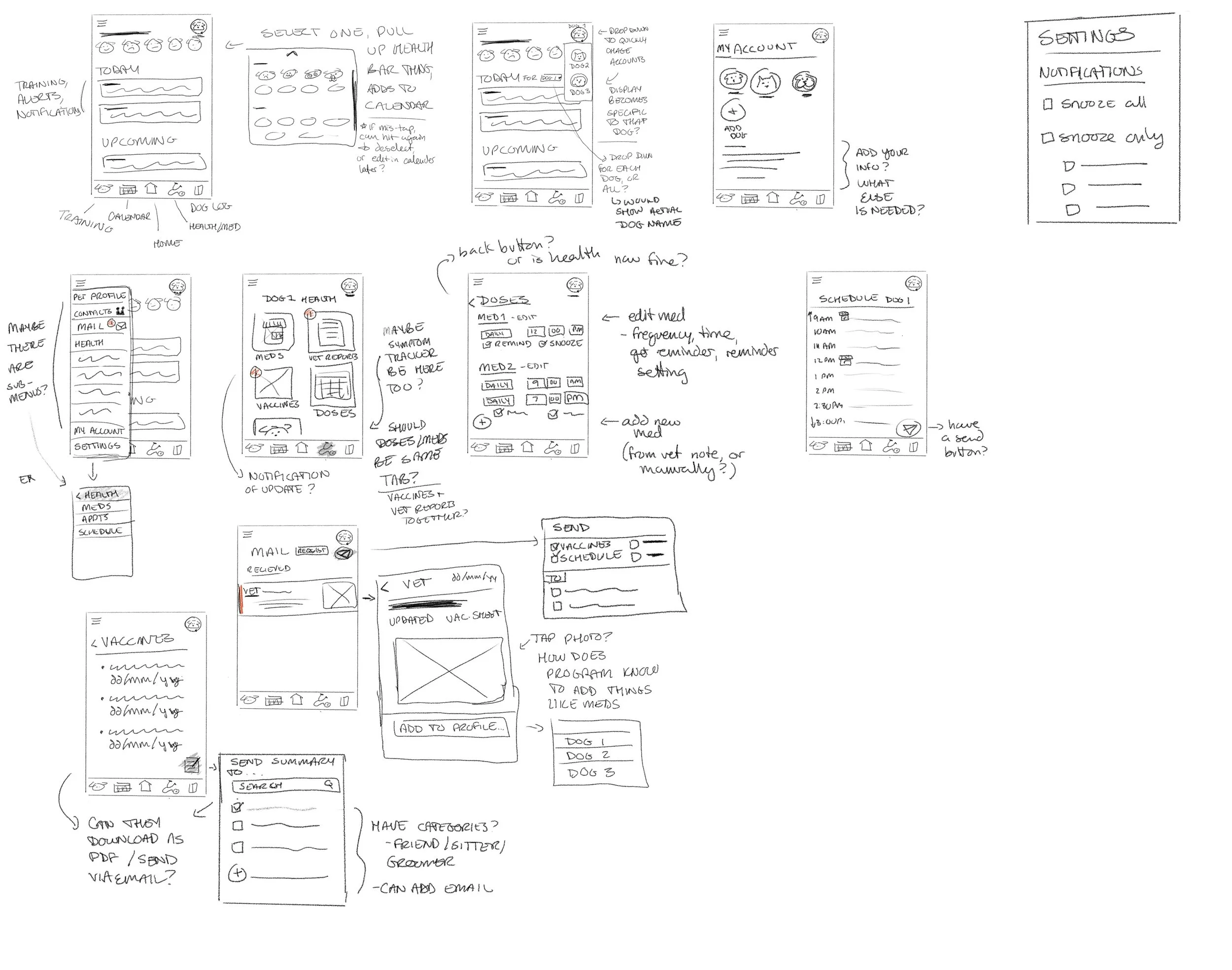
Figure: UX ideation sketches for a dog management app (sketches by Kathy Bently)
Wireframing follows, creating low-fidelity blueprints of interfaces. These skeletal layouts focus on structure, navigation, and functionality without visual details, allowing quick iterations based on user feedback.
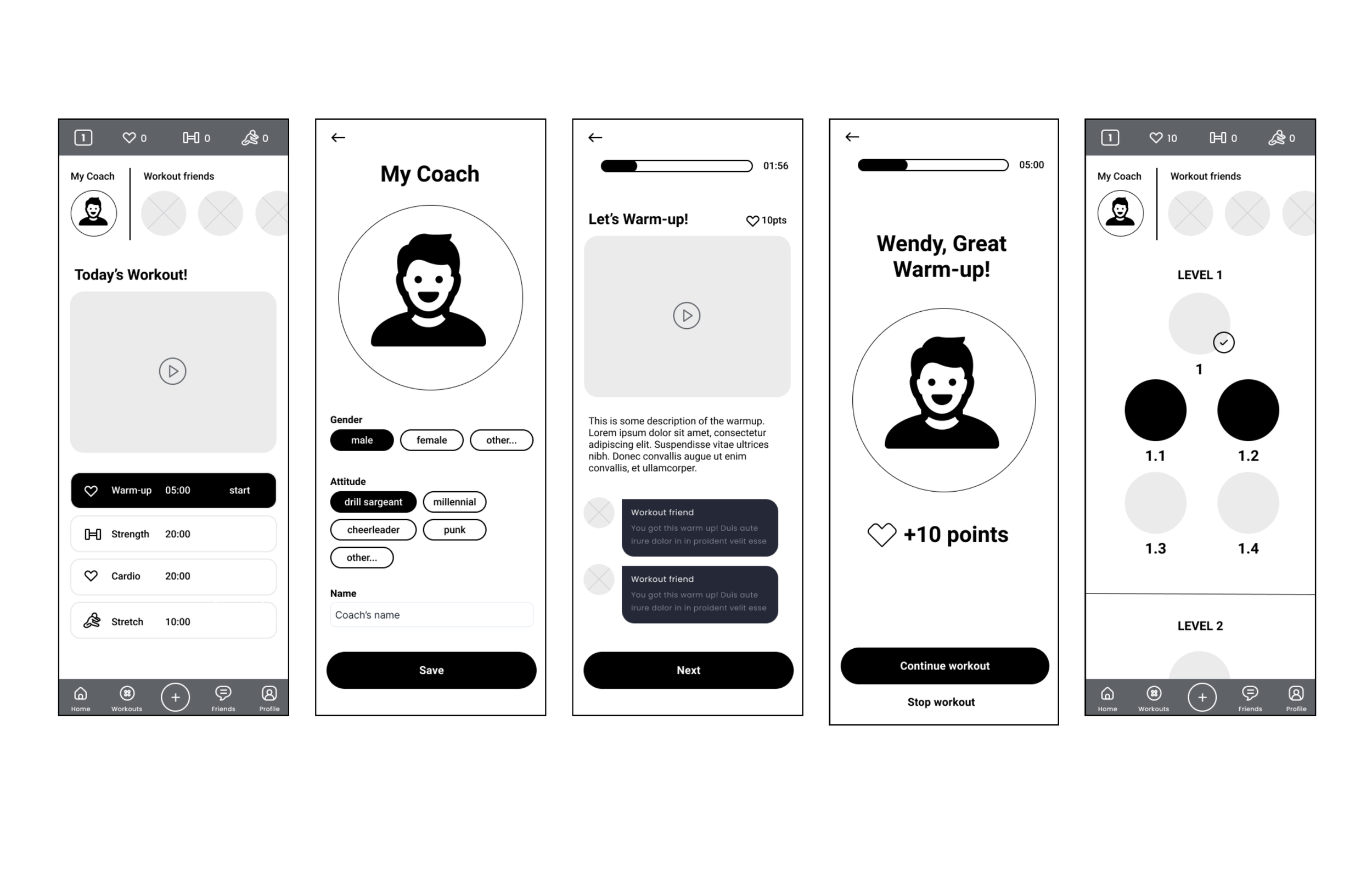
Figure: UX wireframes from my AI Fitness Trainer project
In Data Science (DS), ideation parallels UX by brainstorming hypotheses, data sources, and models to address business questions. Teams sketch algorithms or data flows informally.
Wireframing in DS adapts as visual prototypes of dashboards, pipelines, or ML workflows. Tools like draw.io or Jupyter notebooks outline data processes, ensuring alignment with UX for integrated user-facing products, like analytics interfaces.
By running UX and DS processes in parallel, teams synchronize ideation for cohesive problem-solving and wireframing for seamless prototypes, accelerating development and enhancing end-user value.
Portfolio Progress:
Today I focused on the Data Science part of my portfolio. I’m revisiting some of my basic data science work at Carnegie Mellon University to see what projects I can expand on or improve upon.
For the COVID survey response data pipeline project, I noticed there were end users of the data, including various dashboards and forecasting models. I already see an opportunity for design and data science collaboration from the start.
At the beginning of design discovery, stakeholders, vision keepers, and subject matter experts are established. This sets up the communication format and cadence for the entire project. This also allows us to understand the overall goals and expected results.
As we move into the definition phase, in terms of the data project this is where we would already have done some exploratory data analysis and begun defining the business problem to be solved. This runs in parallel to the synthesis of user research.
In the case of the COVID survey data, the users are the various end users of the dashboards and data outputs. These are public health professionals and researchers. If we examine the goals of these individuals, or had had an opportunity to interview them, we would have a much better idea of their needs before we started designing the various dashboards.
I’ll follow-up with my professor to see what if anything was done with regard to interviewing actual end users of the data.
Resource of the Day:
Baymard Institute
Baymard's product is a UX research platform offering over 150,000 hours of ecommerce UX insights, including:
700+ Best Practice Guidelines: Actionable solutions for UX issues, based on extensive user testing.
UX-Ray 1.0 (Beta): AI-powered scanner for instant ecommerce site analysis against guidelines.
UX-Query (Beta): AI-driven search for quick answers from Baymard’s research database.
200,000+ Annotated UX Design Examples: Inspiration from leading brands.
UX Benchmarking: Compares site performance to industry leaders.
Expert-Led UX Audits: 120-page reports with 40 key improvements.
Review Tool: Self-assess UX performance.
Research Personalization: Tailored audit insights integrated with the database.
Training & Certification: Industry-leading UX courses.
Used by 29,000+ professionals across 80+ countries, including 71% of Fortune 500 ecommerce companies.
Productivity Tip:
Use the "Block and Tackle" technique to stay focused in a fast-paced environment. Today, carve out one 25-minute distraction-free block (e.g., turn off notifications, close unnecessary tabs) to tackle a high-impact task, like drafting a report or brainstorming for a project. Use a timer to stay committed, and reward yourself with a 5-minute break afterward. This focused sprint helps you make significant progress despite the whirlwind of a busy day.